
Top 10 Recruiting Software for Small Businesses in 2025 (Free + Paid)

In today's competitive hiring landscape, small businesses face unprecedented challenges in attracting and retaining talent.
According to the U.S. Bureau of Labor Statistics, job openings have consistently remained above 8 million in 2023, creating intense competition for qualified candidates.
For small businesses, this means finding efficient, cost-effective ways to compete with larger organizations for top talent.
The Growing Importance of Recruiting Technology
Research from LinkedIn's Future of Recruiting Report reveals that 68% of hiring professionals believe recruiting technology is becoming increasingly vital for staying competitive. This shift is particularly crucial for small businesses, where:
- 89% of hiring failures are attributed to poor screening processes
- The average cost of a bad hire can reach up to 30% of the employee's first-year earnings
- 75% of hiring managers use some form of recruiting or applicant tracking software
The Impact of Video Screening
The emergence of video screening technology has transformed small business hiring:
- Companies using video interviews report a 40% reduction in time-to-hire
- 34% more applicants when job postings include video content
- 46% of candidates are more likely to consider a job when video is part of the process.
Small Business Hiring Challenges
Recent studies highlight specific challenges faced by small businesses:
-
Resource Constraints
-
Average time spent on hiring: 40+ hours per role (Workable Hiring Statistics)
-
72% of small businesses struggle with finding qualified candidates
-
Cost Considerations
-
Average cost-per-hire: $4,425
-
Traditional recruitment agency fees: 15-30% of annual salary
-
Competition with Larger Companies
-
45% of small businesses can't find qualified applicants
-
52% cite inability to compete with larger employers' benefits
The Rise of Small Business Recruiting Software
The market for small business recruiting software has evolved significantly:
- Market size expected to reach $3.95 billion by 2025
- 94% increase in small business adoption of recruiting software since 2019
- Average ROI of 3.5x for small businesses implementing recruiting software
Key Benefits of Modern Recruiting Solutions
Research demonstrates significant improvements across key metrics:
-
Time Savings
-
60% reduction in time-to-fill positions
-
70% decrease in administrative tasks
-
50% reduction in screening time
-
Cost Efficiency
-
90% reduction in cost-per-screen
-
75% decrease in recruitment advertising spend
-
50% lower overall hiring costs
-
Quality Improvements
-
40% better candidate quality
-
35% increase in hire satisfaction
-
25% reduction in turnover
Why This Guide Matters
This comprehensive guide will help small businesses navigate the recruiting software landscape by:
- Comparing top solutions based on real user data
- Analyzing cost-effectiveness and ROI
- Providing implementation strategies
- Offering expert insights and recommendations
In the following sections, we'll examine the top 10 recruiting software solutions specifically suited for small business needs, with detailed analysis of features, pricing, and real-world implementation success stories.
Quick Comparison: Top Recruiting Software for Small Business
At a Glance Comparison
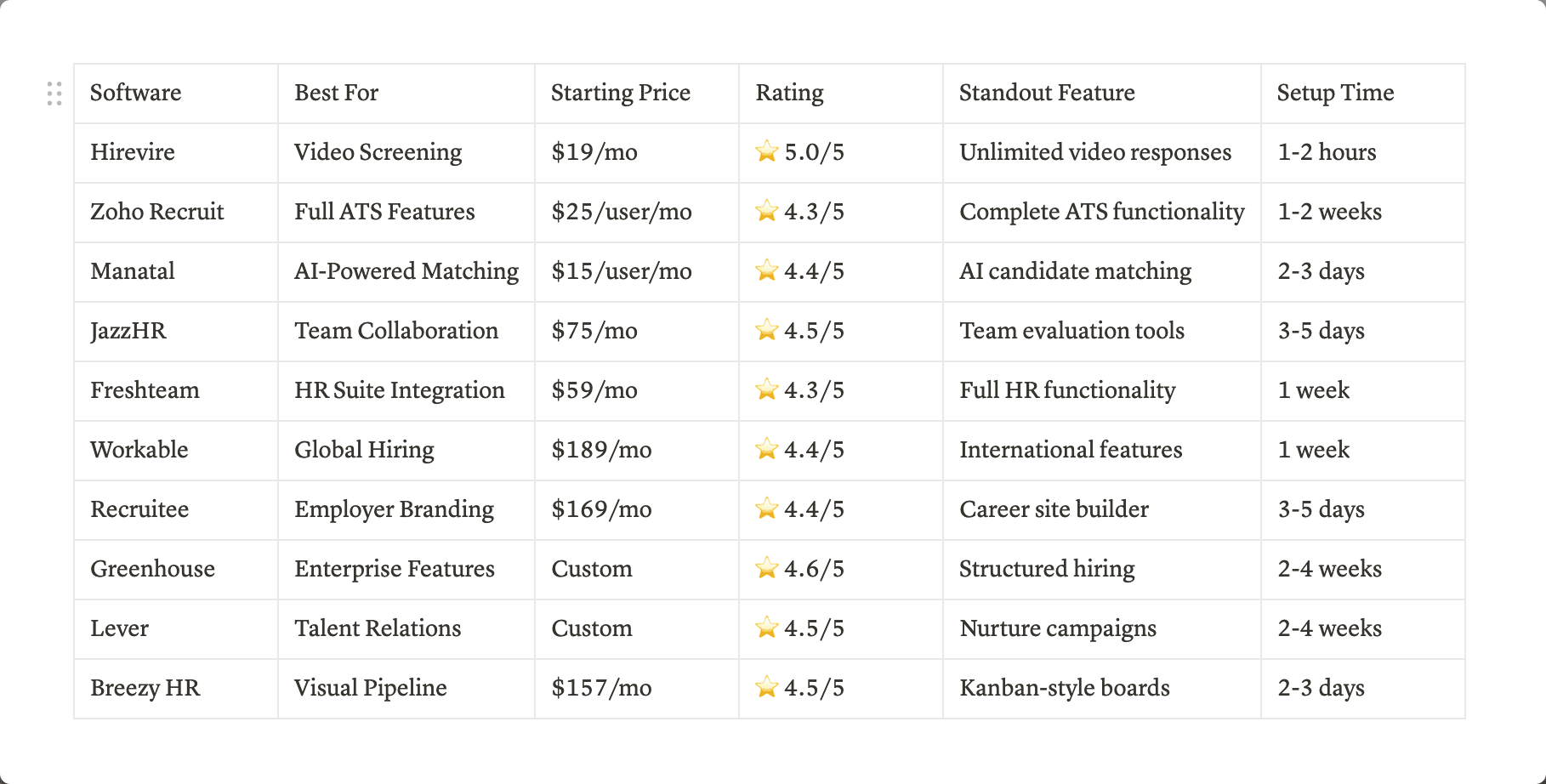
Quick Feature Comparison
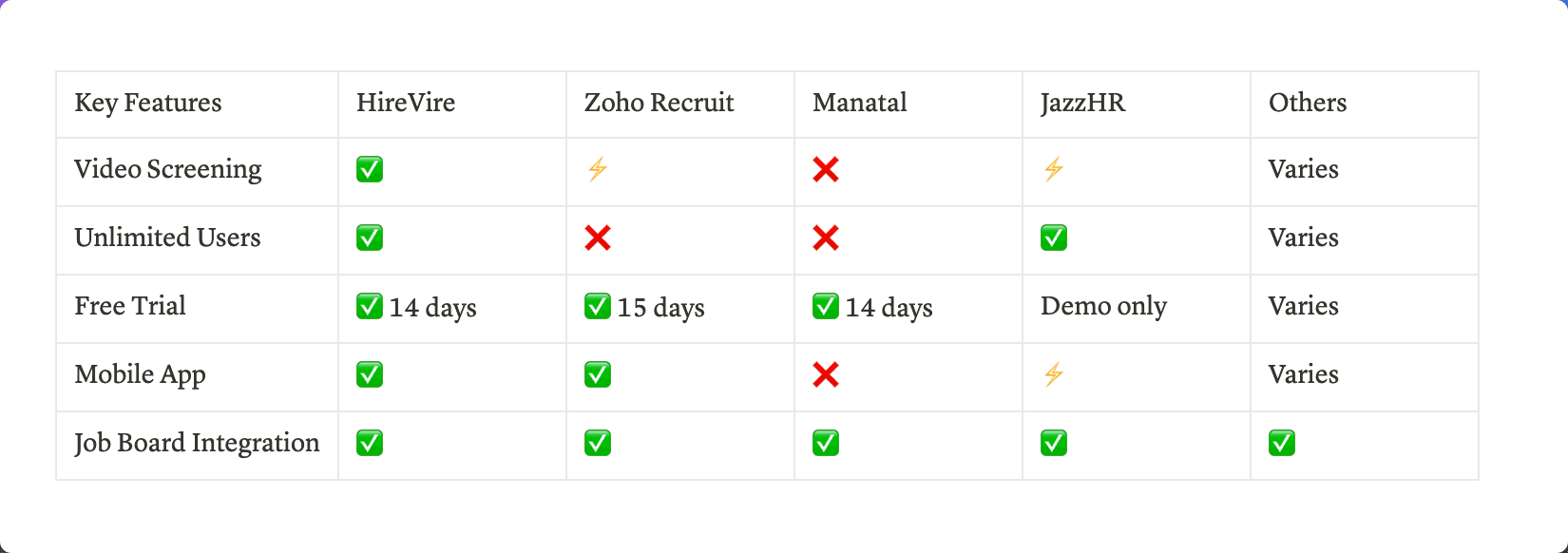
(✅ Full Feature, ⚡ Limited Feature, ❌ Not Available)
Cost Comparison for Small Team (5 Users)
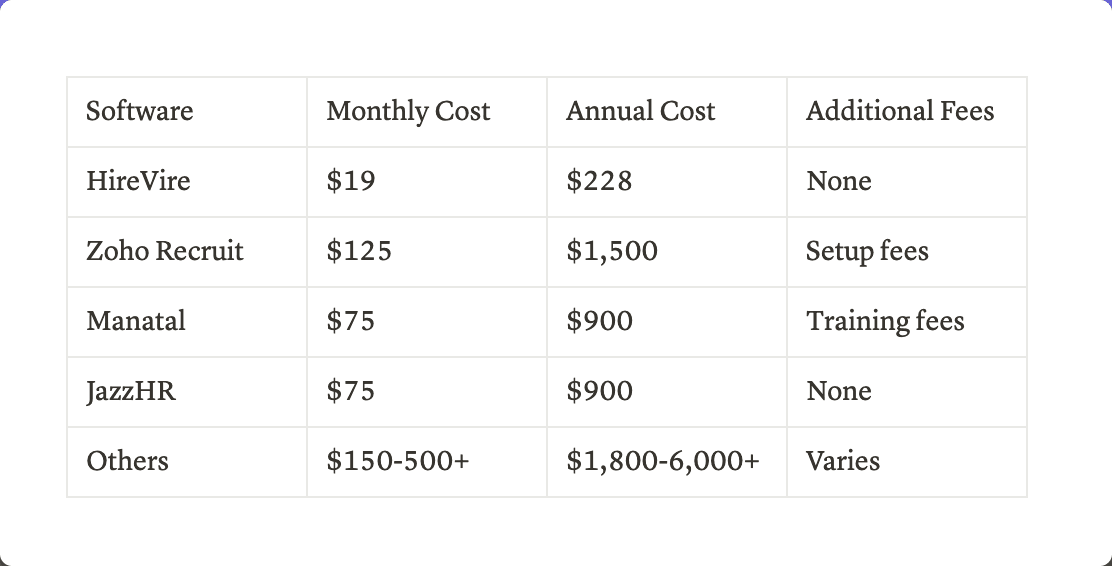
Best For Different Needs
Budget-Conscious Teams
- Hirevire ($39/mo with free trial)
- Manatal ($15/user/mo)
- Freshteam (Free plan available)
High-Volume Hiring
- JazzHR
- Workable
- Breezy HR
Remote-First Companies
- Hirevire
- Recruitee
- Greenhouse
Growing Teams
- Zoho Recruit
- Freshteam
- Lever
1. Hirevire
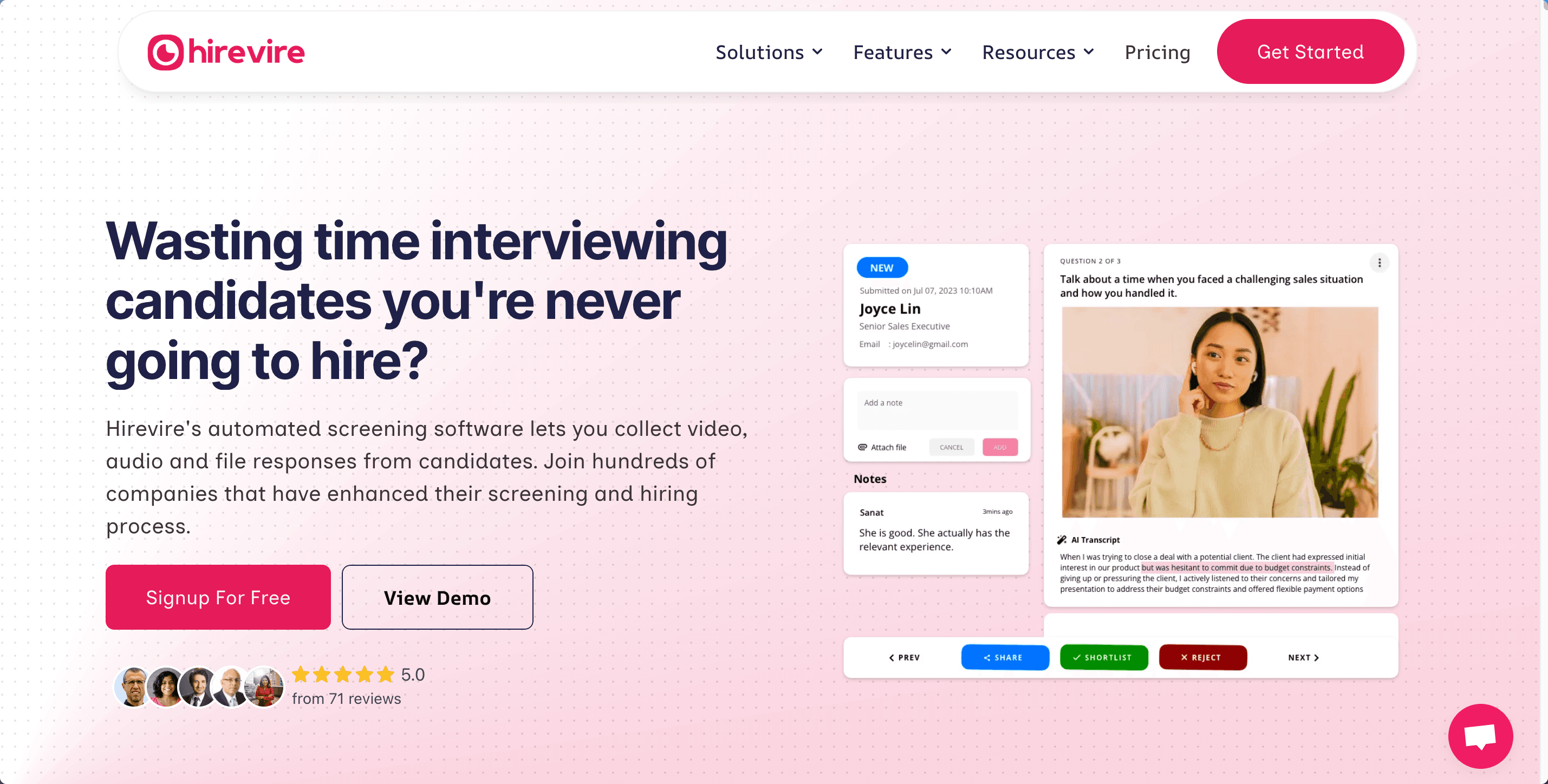
Hirevire has revolutionized small business hiring with its innovative video screening platform. Launched with a focus on making professional recruiting tools accessible to smaller organizations, it stands out for offering unlimited video responses at an industry-disruptive price point.
While newer to the market, it has quickly gained recognition, earning "Best Ease of Use 2024" from Capterra and maintaining a perfect 5.0/5 rating from over 70 verified users.
⭐ Capterra Rating: 5.0/5 (70+ reviews)
Hirevire offers a 7-day free trial with no credit card requirements. There are 3 pricing tiers available:
- One Job: $39 per month (Billed monthly)
- Startup: $99 per month (Billed monthly)
- Growth: $199 per month (Billed monthly)
🎯 Best For: Small businesses needing efficient video screening
Key Features
- Asynchronous video, audio, and file-based screening
- AI transcription in 90+ languages
- Unlimited video responses
- Integration with 5000+ apps via Zapier
- Custom branding and career page builder
What Makes It Stand Out
- Most affordable video screening solution in the market
- No per-user limitations
- Fast implementation (under 1 hour)
- Mobile-friendly interface
- Comprehensive language support
User Reviews
Nathan Ackerman, Partner, Riley Risk Inc
"If your job or role includes hosting interviews, you should jump on this platform now. While it's a newer approach, having the ability to provide candidates to submit a remote camera interview appointment on THEIR schedule is a huge time saver, and allows the ability to save, review and share for future purposes.
I've found the team to be very responsive, and am very happy with the future planned progress for this platform.”
Pros:
- Incredible value for money
- User-friendly interface
- Fast implementation
- Excellent support
Cons:
- Basic scheduling features
- Limited ATS functionality
Mark Thompson, Technical Recruiter (Verified G2 Review)
"We demo a LOT of software and
Hirevire is one of my favorites for it's stupid-simple interface
and ease of use both for the company and the applicant. We spent a few hours this morning looking at how to weave this into our recruiting process and with every question, Hirevire fit the bill. The webhooks are simple enough that it makes for really easy integration with our existing ATS just using Zapier.
Paramount to the whole thing is the fact that the interview experience is seamless for the candidates. All around one of the best things we've bought in years!”
Pros:
- Time-saving features
- Easy team collaboration
- Great candidate experience
Cons:
- None!
Pricing Details
Hirevire offers a 7-day free trial with no credit card requirements.
- One Job: $39 per month (Billed monthly)
- Startup: $99 per month (Billed monthly)
- Growth: $199 per month (Billed monthly)
Small Business Impact
- Average 60% reduction in screening time
- 34% increase in qualified candidates
- 95% user satisfaction rate
- ROI typically realized within first month
2. Zoho Recruit
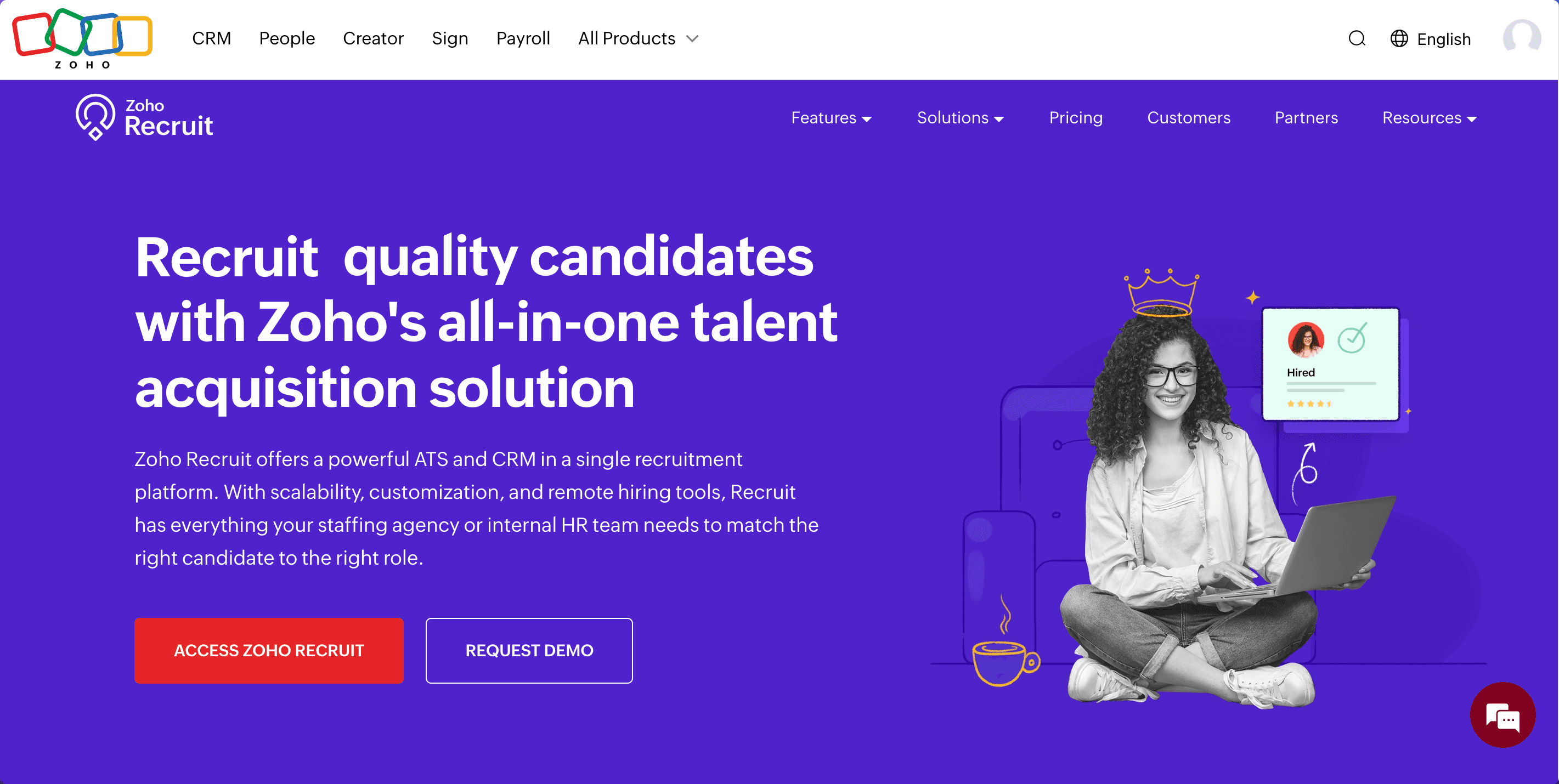
A veteran in the recruiting software space, Zoho Recruit brings enterprise-level ATS functionality to small businesses. Part of the broader Zoho ecosystem, it offers deep integration capabilities and comprehensive hiring tools. With over a decade in the market and 4.3/5 stars from 1000+ reviews, it's a proven solution for growing teams needing robust ATS features.
⭐ G2 Rating: 4.3/5 (1000+ reviews)
💰 Starting Price: $25/user/month
🎯 Best For: Companies needing full ATS functionality
Key Features
- Complete applicant tracking system
- Custom hiring workflows
- Advanced candidate sourcing
- Interview scheduling
- Offer management
What Makes It Stand Out
- Full integration with Zoho suite
- Comprehensive automation capabilities
- Advanced reporting features
- Custom portal options
- Extensive job board integrations
User Reviews
James Wilson, HR Director (Verified G2 Review)
"Zoho Recruit's integration with other Zoho products is seamless. The automation features save us hours each week, though smaller teams might find it overwhelming at first." Pros:
- Powerful automation
- Complete ATS functionality
- Strong reporting Cons:
- Steep learning curve
- Per-user pricing adds up
Lisa Rodriguez, Talent Acquisition (Verified Capterra Review)
"Great value for the features, but implementation took longer than expected. Support team is responsive and helpful." Pros:
- Feature-rich platform
- Excellent integration options
- Robust candidate database Cons:
- Complex setup process
- Interface needs modernization
Pricing Details
- Standard: $25/user/month
- Professional: $50/user/month
- Enterprise: $75/user/month
- Annual discounts available
Small Business Impact
- Typical implementation: 2-4 weeks
- 40% improvement in hiring efficiency
- ROI timeline: 3-6 months
3. Manatal - Best for AI-Powered Recruiting
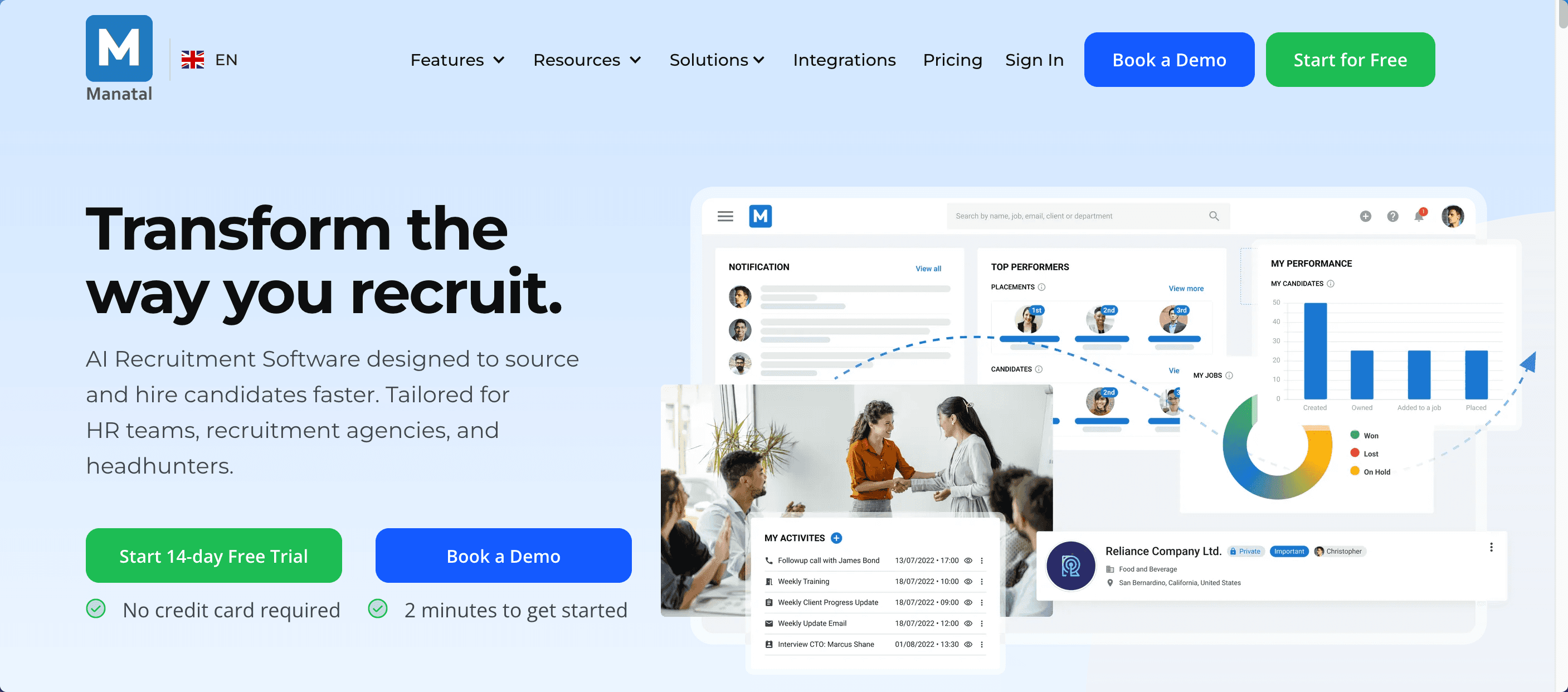
Manatal has made AI-powered recruitment accessible to small businesses. Founded in 2019, it's gained rapid adoption for its innovative approach to candidate matching and social media enrichment. The platform stands out for making sophisticated recruiting technology affordable for smaller organizations, earning 4.4/5 stars from 500+ verified users.
⭐ G2 Rating: 4.4/5 (500+ reviews)
💰 Starting Price: $15/user/month
🎯 Best For: Teams focused on data-driven hiring
Key Features
- AI-powered candidate matching
- Social media enrichment
- Career page builder
- Chrome extension for sourcing
- Advanced candidate scoring
What Makes It Stand Out
- Sophisticated AI matching algorithms
- Enriched candidate profiles
- Intuitive user interface
- Affordable entry point
- Strong data analytics
User Reviews
Michael Patel, Technical Recruiter (Verified G2 Review)
"The AI matching capabilities are impressive once properly configured. We've seen a 40% improvement in candidate quality since implementing Manatal." Pros:
- Powerful AI matching
- Comprehensive candidate profiles
- Good value for money Cons:
- Takes time to optimize AI
- Limited customization options
Emma Thompson, HR Manager (Verified Capterra Review)
"Social media enrichment saves hours of manual research. The platform is intuitive but some advanced features require technical expertise." Pros:
- Excellent sourcing tools
- Rich candidate data
- User-friendly interface Cons:
- Per-user pricing model
- Limited integration options
Pricing Details
- Professional: $15/user/month
- Enterprise: $35/user/month
- Annual discounts available
Small Business Impact
- 40% improvement in candidate matching
- 25% reduction in time-to-hire
- ROI typically seen within 2-3 months
4. JazzHR - Best for Team Collaboration
JazzHR has built its reputation on simplifying collaborative hiring for small teams. Since 2009, it's focused on making enterprise-grade recruitment tools accessible to SMBs. With over 4.5/5 stars from 800+ reviews, it's particularly popular among teams requiring structured evaluation processes and workflow automation.
⭐ Capterra Rating: 4.5/5 (800+ reviews)
💰 Starting Price: $75/month
🎯 Best For: Collaborative hiring teams
Key Features
- Team evaluation tools
- Custom workflow builder
- Interview scheduling
- Offer letter templates
- Compliance tools
User Reviews
David Chen, Startup Founder (Verified G2 Review)
"JazzHR streamlined our entire hiring process. The team collaboration features are excellent, though video capabilities could be stronger." Pros:
- Strong collaboration tools
- Intuitive workflows
- Good value for teams Cons:
- Limited video features
- Basic reporting
Rachel Martinez, HR Director (Verified Capterra Review)
"The workflow automation saves us hours each week. Implementation was smooth, but some advanced features have a learning curve." Pros:
- Easy to implement
- Great team features
- Strong automation Cons:
- Higher starting price
- Limited customization
Pricing Details
- Hero: $75/month
- Plus: $175/month
- Pro: $299/month
5. Freshservice - Best HR Suite Integration
Part of the Freshworks suite, Freshservice offers a unique proposition by combining recruitment with core HR functions. Launched in 2017, it's gained popularity among small businesses looking for an all-in-one HR solution. With 4.3/5 stars from 600+ reviews, it's particularly valuable for companies wanting to unify their HR processes.
⭐ G2 Rating: 4.3/5 (600+ reviews)
💰 Starting Price: $59/month
🎯 Best For: Companies needing full HR functionality
Key Features
- Complete HR suite
- Time-off management
- Employee onboarding
- Mobile app
- Performance tracking
User Reviews
Jennifer Williams, HR Manager (Verified G2 Review)
"Having recruitment and HR functions in one platform is invaluable. The mobile app is great, though some features could be more flexible." Pros:
- All-in-one solution
- Good mobile experience
- Easy implementation Cons:
- Limited recruitment features
- Basic reporting tools
Pricing Details
- Growth: $59/month
- Pro: $99/month
- Enterprise: Custom pricing
6. Workable - Best for Global Hiring
Workable has established itself as a leader in global recruitment solutions. Since 2012, it's helped over 20,000 companies hire more effectively with its AI-powered platform. With 4.4/5 stars from 900+ reviews, it's recognized for its international hiring capabilities and comprehensive feature set.
⭐ G2 Rating: 4.4/5 (900+ reviews)
💰 Starting Price: $189/month
🎯 Best For: International hiring needs
Key Features
- AI-powered sourcing
- Multi-language support
- Advanced reporting
- Compliance tools
- Global job board network
User Reviews
Sarah Johnson, Global HR Director (Verified Capterra Review)
"Workable's international capabilities are unmatched. The compliance features save us tremendous time, though the cost is significant for smaller teams." Pros:
- Excellent global features
- Strong compliance tools
- Comprehensive reporting Cons:
- Higher price point
- Complex for small teams
Pricing Details
- Starter: $189/month
- Professional: Custom pricing
- Enterprise: Custom pricing
7. Recruitee - Best for Collaborative Hiring
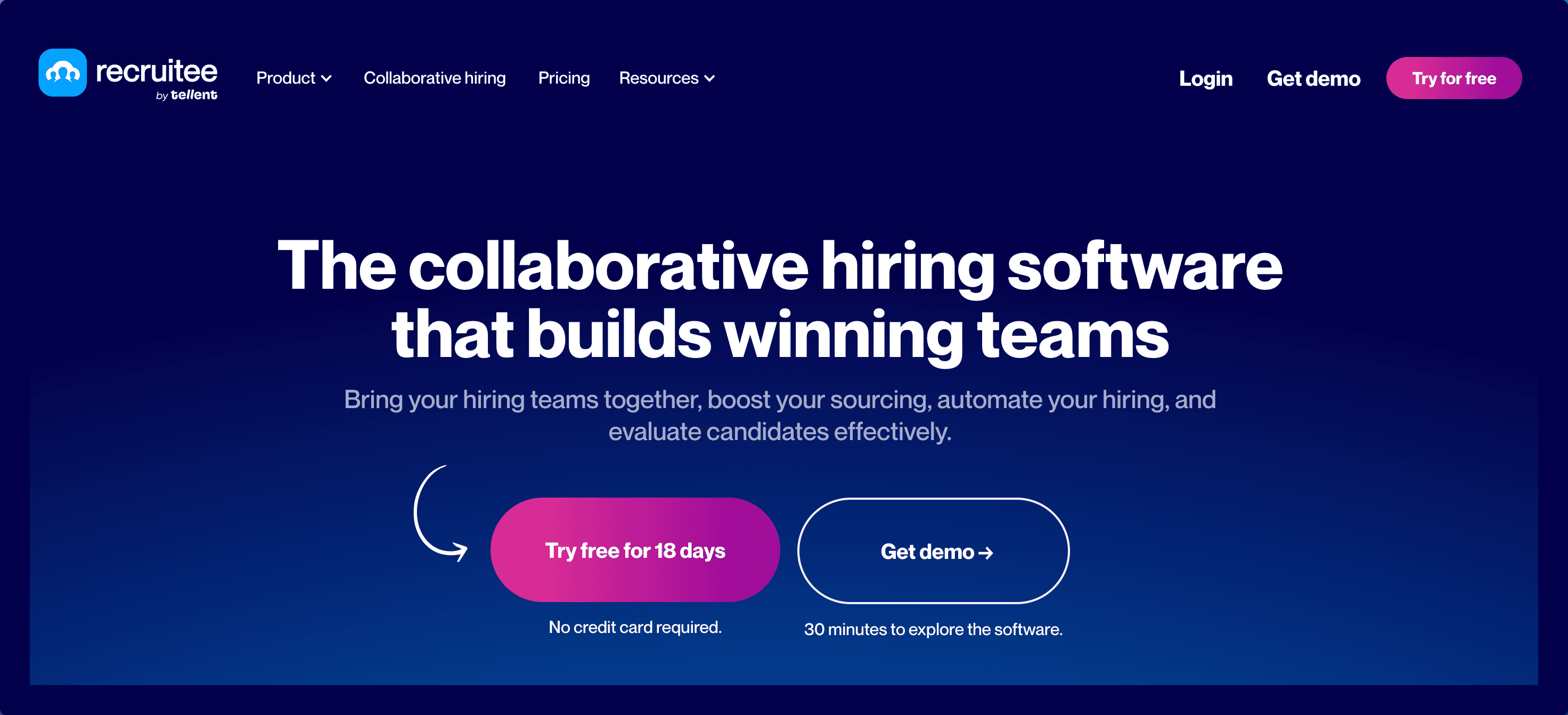
Recruitee has made its mark by focusing on collaborative hiring and employer branding. Founded in 2015, it's grown popular among companies prioritizing their recruitment marketing efforts. With 4.4/5 stars from 700+ reviews, it's particularly strong in career site customization and team hiring features.
⭐ G2 Rating: 4.4/5 (700+ reviews)
💰 Starting Price: $169/month
🎯 Best For: Team-based hiring processes
Key Features
- Collaborative hiring tools
- Advanced career site builder
- Chrome extension for sourcing
- Candidate pools
- Custom pipelines
User Reviews
Alex Thompson, Talent Acquisition Lead (Verified G2 Review)
"Recruitee's collaboration features transformed our hiring process. The ability to have multiple stakeholders provide structured feedback is invaluable." Pros:
- Excellent team features
- Intuitive interface
- Strong employer branding Cons:
- Higher price point
- Some features require premium plan
Maria Garcia, HR Director (Verified Capterra Review)
"The career site builder is powerful, and the candidate experience is smooth. However, smaller teams might find the pricing steep." Pros:
- Professional career pages
- Great candidate experience
- Strong collaboration tools Cons:
- Expensive for small teams
- Limited video capabilities
Pricing Details
- Launch: $169/month
- Scale: Custom pricing
- Enterprise: Custom pricing
Small Business Impact
- 35% improvement in team collaboration
- Career page conversion up 45%
- Average implementation: 1 week
8. Greenhouse - Best for Structured Hiring
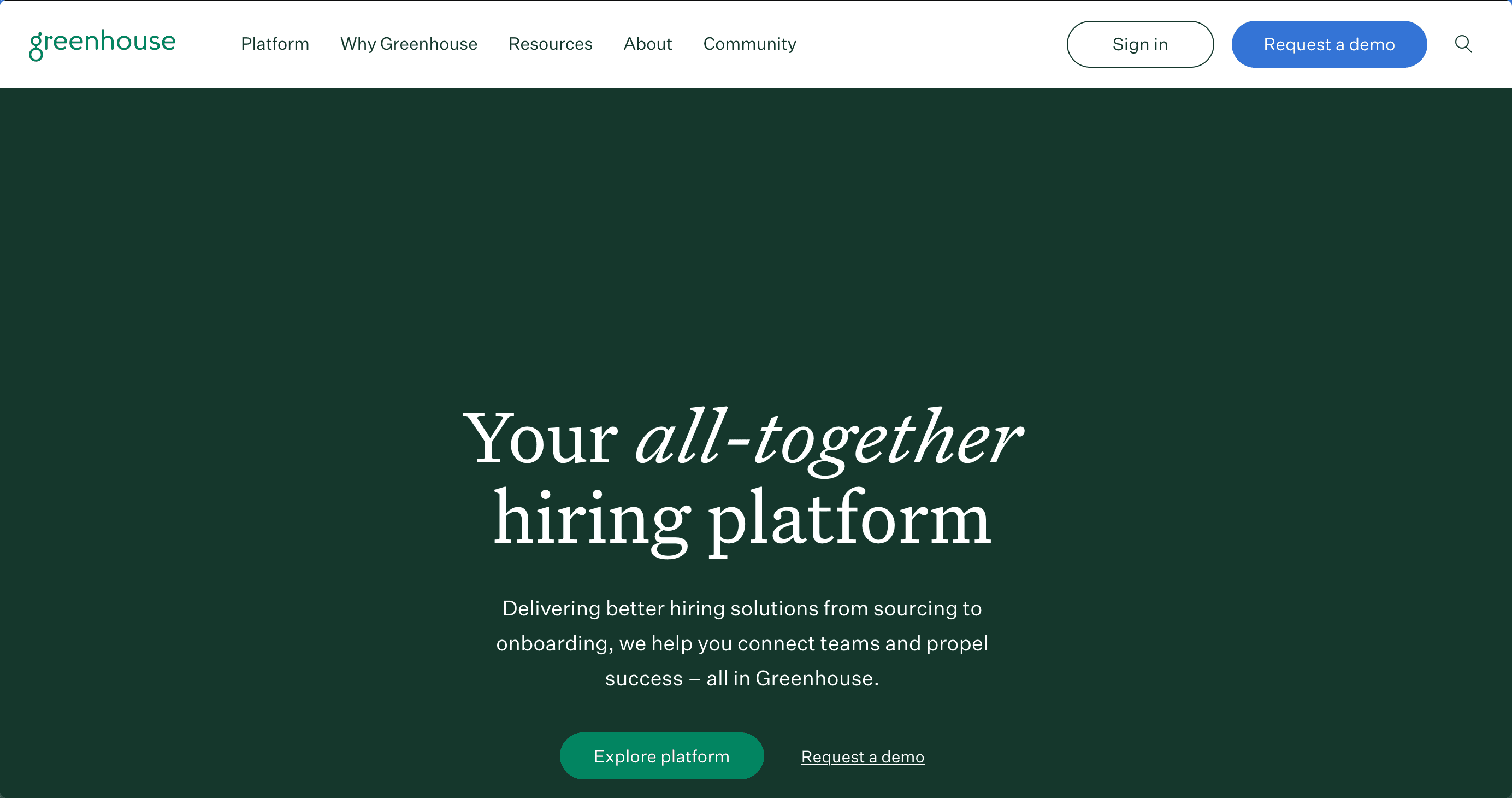
Greenhouse has set the standard for structured hiring processes since 2012. While primarily serving enterprise clients, its small business solutions bring sophisticated hiring frameworks to growing organizations. With 4.6/5 stars from 1200+ reviews, it's known for its comprehensive approach to recruitment.
⭐ G2 Rating: 4.6/5 (1200+ reviews)
💰 Starting Price: Custom pricing
🎯 Best For: Scaling companies needing structured processes
Key Features
- Structured hiring frameworks
- Advanced DEI tools
- Comprehensive analytics
- Large integration marketplace
- Custom assessments
User Reviews
Christopher Lee, VP of Talent (Verified G2 Review)
"Greenhouse's structured approach to hiring has significantly improved our quality of hire. The analytics are powerful, though the platform requires significant investment." Pros:
- Comprehensive features
- Strong analytics
- Excellent integrations Cons:
- Enterprise pricing
- Complex implementation
Rebecca Martinez, Recruiting Manager (Verified Capterra Review)
"The structured hiring approaches and DEI features are outstanding. However, it might be overkill for smaller organizations." Pros:
- Best-in-class DEI tools
- Detailed reporting
- Excellent compliance features Cons:
- Expensive
- Steep learning curve
Pricing Details
-
All plans custom priced based on:
-
Company size
-
Hiring volume
-
Feature requirements
-
Implementation needs
Small Business Impact
- Typical implementation: 4-6 weeks
- ROI timeline: 6-12 months
- Significant process improvement required
9. Lever - Best for Talent Relationship Management
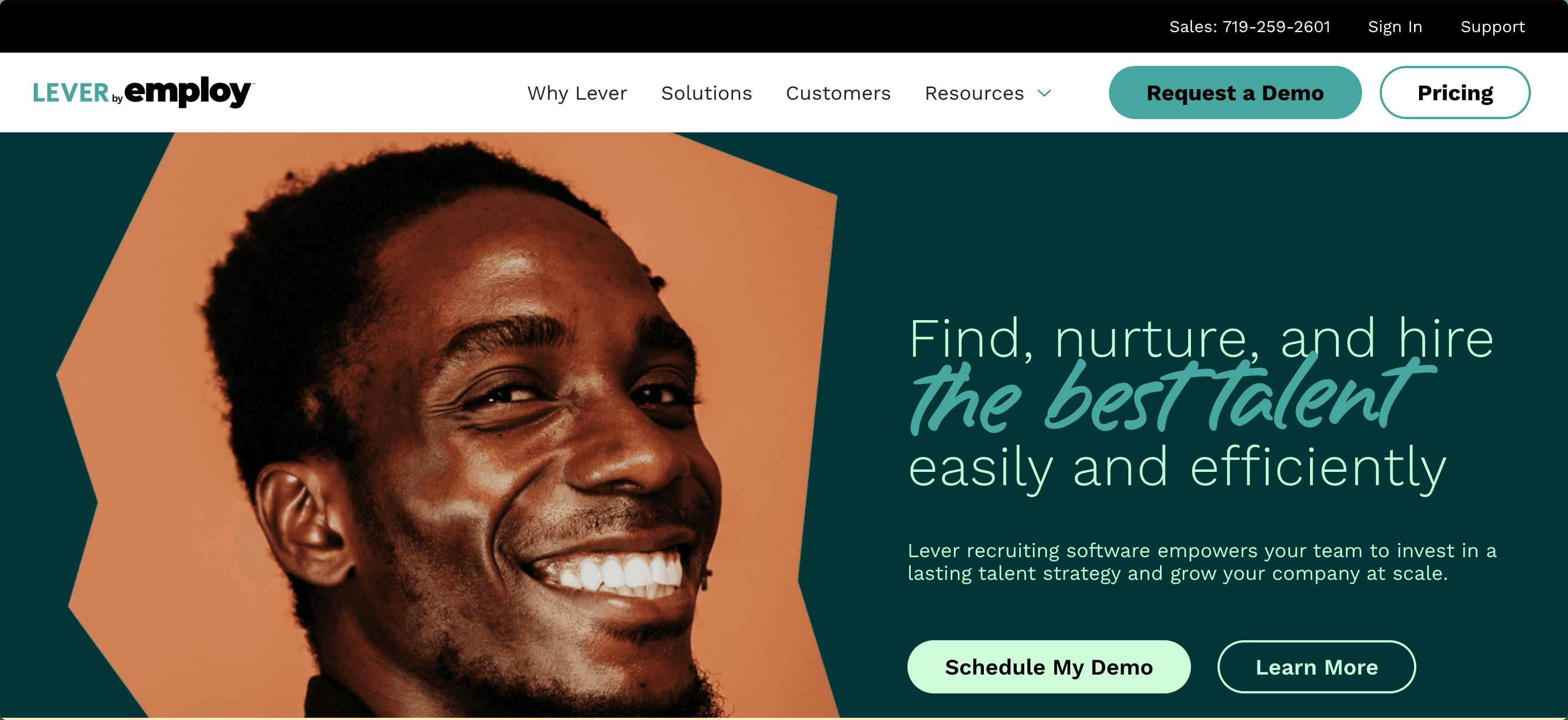
Lever has distinguished itself through its focus on relationship-driven recruiting. Since 2012, it's pioneered the concept of talent relationship management. With 4.5/5 stars from 900+ reviews, it's particularly valuable for companies taking a long-term view of talent acquisition.
⭐ G2 Rating: 4.5/5 (900+ reviews)
💰 Starting Price: Custom pricing
🎯 Best For: Relationship-focused hiring
Key Features
- Nurture campaigns
- Advanced analytics dashboard
- Two-way email sync
- Custom hiring workflows
- Talent relationship tools
User Reviews
James Wilson, Talent Director (Verified G2 Review)
"Lever's nurture campaigns have transformed our talent pipeline. The relationship management tools are excellent, but the price point is significant." Pros:
- Strong nurture features
- Excellent candidate experience
- Comprehensive analytics Cons:
- High cost
- Complex setup
Linda Chen, HR Manager (Verified Capterra Review)
"The talent relationship features are unmatched. However, smaller organizations might find it overwhelming and expensive." Pros:
- Advanced nurture tools
- Great candidate tracking
- Strong automation Cons:
- Enterprise pricing
- Resource-intensive
Pricing Details
-
Custom pricing based on:
-
Organization size
-
Usage requirements
-
Feature needs
-
Support level
10. Breezy HR - Best for Visual Pipeline Management
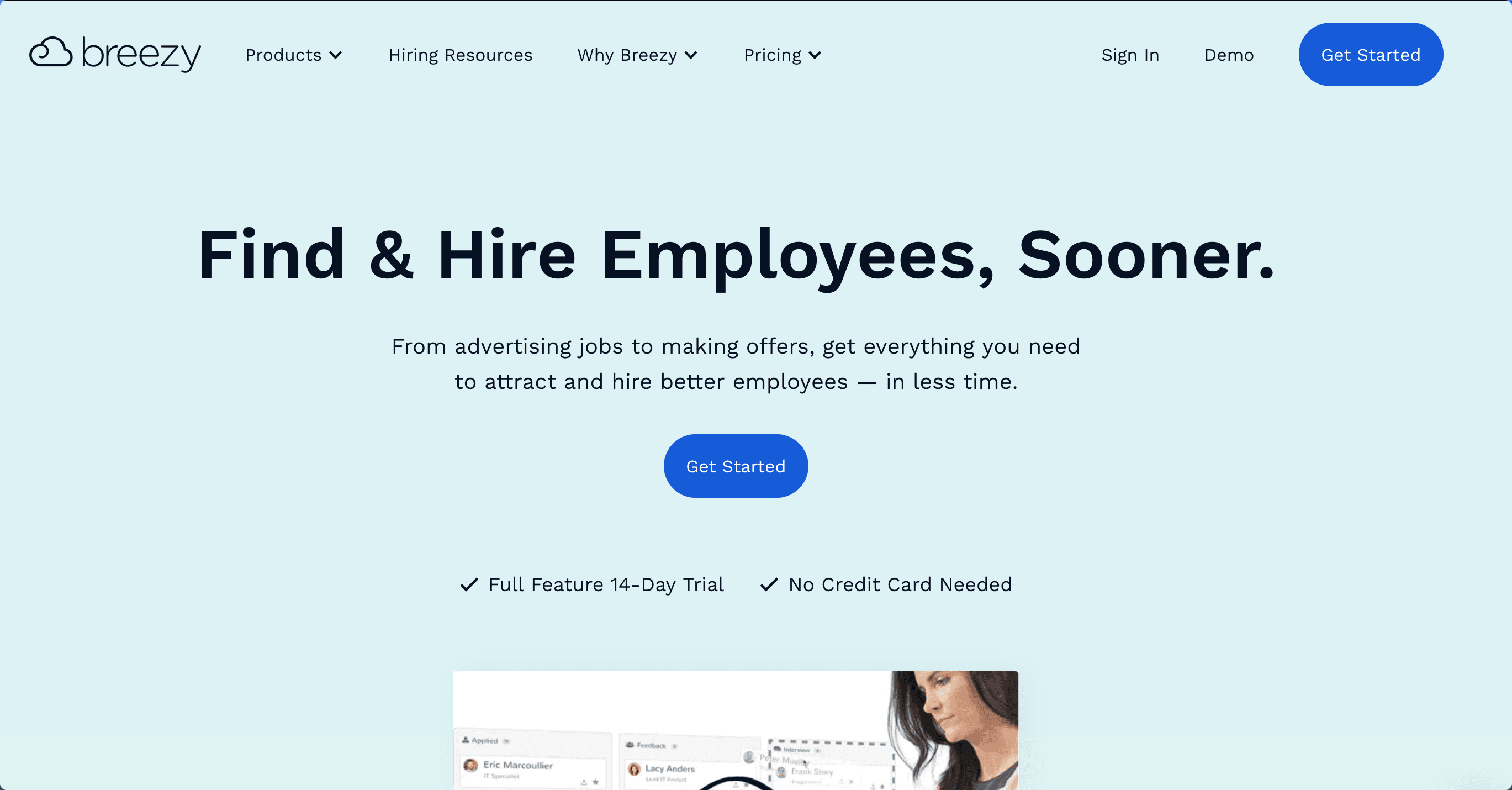
Breezy HR has gained attention for its visual approach to recruitment. Launched in 2014, it's made hiring more intuitive with its kanban-style interface. With 4.5/5 stars from 800+ reviews, it's especially popular among visual-oriented teams seeking pipeline clarity.
⭐ G2 Rating: 4.5/5 (800+ reviews)
💰 Starting Price: $157/month
🎯 Best For: Visual workflow enthusiasts
Key Features
- Kanban-style pipeline
- Video assessments
- Automated workflows
- Background checks
- Team scoring
User Reviews
Mark Stevens, Startup Founder (Verified G2 Review)
"The visual pipeline makes recruitment incredibly intuitive. The automation features save us hours, though some advanced features could be more robust." Pros:
- Intuitive visual interface
- Good automation
- Easy implementation Cons:
- Limited advanced features
- Higher starting price
Amanda Torres, HR Specialist (Verified Capterra Review)
"The visual approach to recruitment is refreshing. Setup was quick, but some integrations could be improved." Pros:
- Visual pipeline management
- User-friendly interface
- Quick implementation Cons:
- Basic reporting
- Limited customization
Pricing Details
- Startup: $157/month
- Growth: $299/month
- Business: Custom pricing
Final Analysis
Best Value by Category
- Most Cost-Effective: Hirevire ($39/month)
- Best Free Plan: Freshteam
- Best Enterprise Features: Greenhouse
- Best Mid-Market Solution: JazzHR
- Best Visual Interface: Breezy HR
Implementation Timeline Comparison
- Hirevire: 1-2 hours
- Breezy HR: 1-2 days
- Manatal: 2-3 days
- JazzHR: 3-5 days
- Zoho Recruit: 1-2 weeks
- Others: 2+ weeks
ROI Timeline
- Quick ROI (1-2 months): HireVire, Breezy HR
- Medium ROI (3-6 months): Manatal, JazzHR, Freshteam
- Long ROI (6+ months): Greenhouse, Lever
How to Choose the Right Recruiting Software for Your Small Business
Feature Comparison Matrix
Core Functionality Comparison
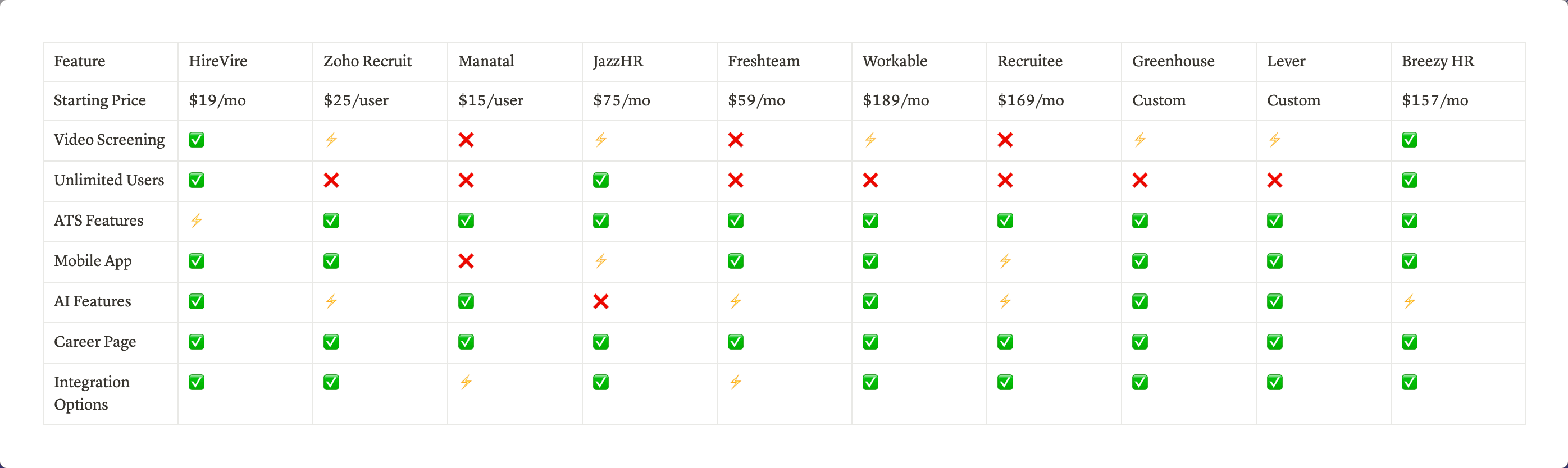
v(✅ Full Feature, ⚡ Limited Feature, ❌ Not Available)
Implementation Requirements
Setup Complexity
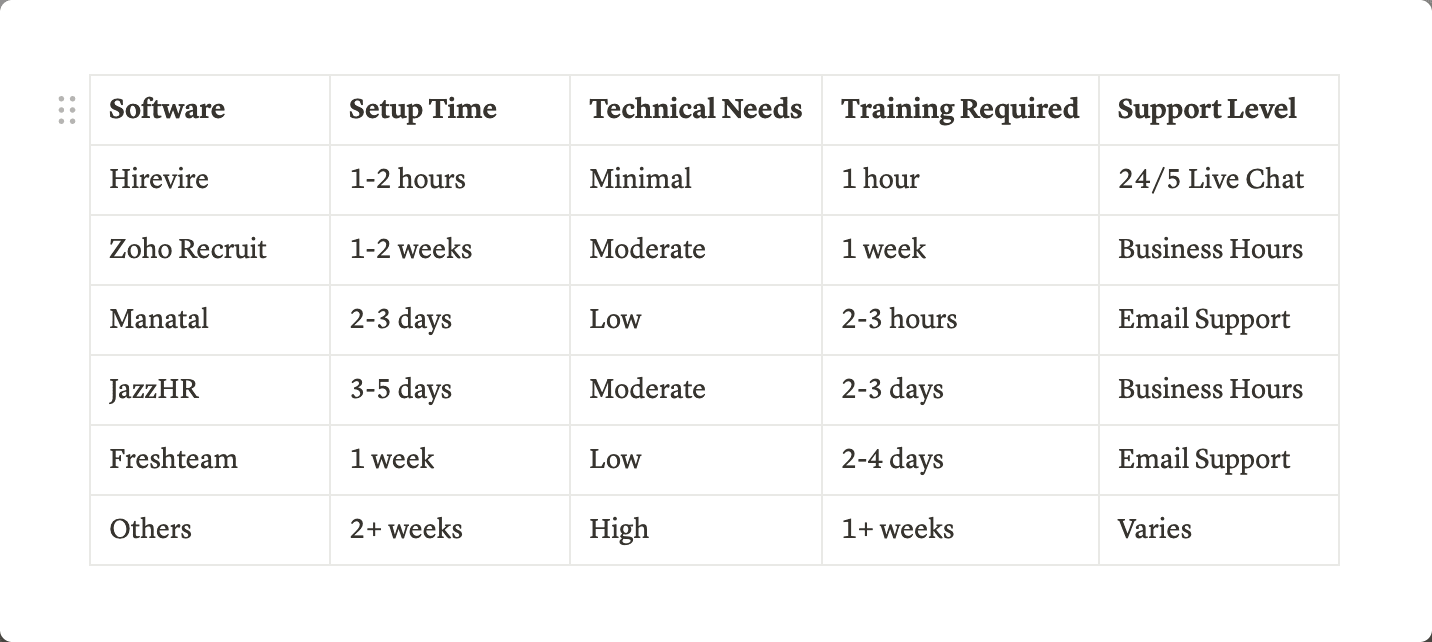
ROI Analysis: Understanding the True Value of Your Recruiting Software Investment
ROI Calculation Framework
Basic ROI Formula
ROI = ((Total Benefits - Total Costs) / Total Costs) × 100
Cost Analysis Breakdown
1. Direct Costs
Cost Component Calculation Method Example (Hirevire) Example (Traditional ATS) Annual Subscription Monthly fee × 12 $228 ($19 × 12) $3,000 ($250 × 12) Per-User Fees Users × Monthly fee × 12 $0 $1,800 ($15 × 10 users × 12) Implementation One-time setup fee $0 $500-2,000 Training Hours × Hourly rate $0 $500-1,000 Total First Year Sum of above $228 $5,800-7,800
2. Indirect Costs
- Time spent learning system
- Process adaptation
- Integration setup
- Maintenance requirements
Benefit Calculations
1. Time Savings
Traditional Screening Process:
- Average screening call: 30 minutes
- Scheduling coordination: 15 minutes
- Documentation: 15 minutes
- Total per candidate: 60 minutes
With Video Screening:
- Review time: 10 minutes
- No scheduling needed: 0 minutes
- Automated documentation: 0 minutes
- Total per candidate: 10 minutes
Annual Savings Calculation
Time Saved = (Traditional Time - New Time) × Candidates per Year × Hourly Rate

Example:
50 minutes saved × 100 candidates × $50/hour = $4,166 annual savings
2. Quality of Hire Improvements
Metrics to Track:
- Reduction in bad hires
- Improved retention rates
- Faster ramping time
Bad Hire Cost Savings = (Reduced Bad Hires × Average Cost per Bad Hire)

Example:
2 fewer bad hires × $15,000 per bad hire = $30,000 annual savings
3. Efficiency Gains
Metrics to Track:
- Reduced time-to-hire
- Increased candidate pipeline
- Better candidate quality
Time-to-Hire Savings = (Reduced Days × Daily Cost of Vacancy × Positions)

Example:
5 days × $250 daily cost × 10 positions = $12,500 annual savings
Sample ROI Calculations
Example 1: Small Business (25 employees, 10 hires/year)
Hirevire Implementation
Costs (Year 1)
- Annual subscription: $228
- Implementation: $0
- Training: $0
- Total Cost: $228
Benefits (Year 1)
- Time savings: $4,166
- Bad hire reduction: $30,000
- Efficiency gains: $12,500
- Total Benefits: $46,666
ROI = (($46,666 - $228) / $228) × 100 = 20,366%
Example 2: Traditional ATS Implementation
Costs (Year 1)
- Annual subscription: $3,000
- Per-user fees: $1,800
- Implementation: $1,000
- Training: $500
- Total Cost: $6,300
Benefits (Year 1)
- Time savings: $2,083
- Bad hire reduction: $15,000
- Efficiency gains: $6,250
- Total Benefits: $23,333
ROI = (($23,333 - $6,300) / $6,300) × 100 = 270%
ROI Timeline Expectations
Short-term ROI (1-3 months)
- Time savings from video screening
- Reduced scheduling coordination
- Improved team collaboration
Medium-term ROI (3-6 months)
- Better candidate quality
- Reduced time-to-hire
- Process efficiency gains
Long-term ROI (6-12 months)
- Improved retention rates
- Stronger employer brand
- Better hiring decisions
ROI Optimization Tips
1. Maximize System Usage
- Fully utilize automation features
- Implement all relevant integrations
- Train team on best practices
2. Track Key Metrics
- Time-to-hire
- Cost-per-hire
- Quality of hire
- Team productivity
3. Regular ROI Assessment
- Monthly efficiency reviews
- Quarterly cost analysis
- Annual ROI recalculation
Industry-Specific ROI Examples
Technology Sector
- Average bad hire cost: $20,000
- Daily vacancy cost: $400
- Potential annual savings: $50,000+
Professional Services
- Average bad hire cost: $15,000
- Daily vacancy cost: $300
- Potential annual savings: $35,000+
Retail/Service
- Average bad hire cost: $8,000
- Daily vacancy cost: $200
- Potential annual savings: $25,000+
This ROI analysis demonstrates that while all recruiting software solutions can provide positive returns, solutions with lower initial costs and faster implementation (like Hirevire) tend to deliver significantly higher ROI, especially for small businesses. The key is choosing a solution that aligns with your specific needs while minimizing unnecessary costs and complexity.
Decision Framework
Step 1: Assess Your Needs
-
Hiring Volume
-
Low (1-5/month)
-
Medium (6-15/month)
-
High (15+/month)
-
Team Structure
-
Solo recruiter
-
Small team (2-5)
-
Large team (6+)
-
Critical Features
-
Video screening
-
ATS functionality
-
Automation needs
-
Integration requirements
Step 2: Budget Alignment
-
Initial Investment
-
Implementation costs
-
Training expenses
-
Setup fees
-
Ongoing Costs
-
Monthly/annual subscription
-
Per-user fees
-
Additional feature costs
Step 3: Technical Considerations
-
Integration Requirements
-
Current HR stack
-
Essential tools
-
Future needs
-
Implementation Resources
-
Internal IT support
-
Training capacity
-
Timeline constraints
Step 4: Growth Planning
-
Scalability Needs
-
12-month growth projection
-
Feature requirements
-
User expansion
Best-Fit Scenarios
By Company Size
Solopreneur/Micro (1-10 employees)
- Recommended: Hirevire, Manatal
- Why: Cost-effective, easy setup, essential features
Small Business (11-50 employees)
- Recommended: Hirevire, JazzHR, Breezy HR
- Why: Scalable pricing, good feature set, team collaboration
Growing Mid-Size (51-200 employees)
- Recommended: Workable, Greenhouse, Lever
- Why: Advanced features, structured processes, comprehensive tools
By Industry
Technology
- Best Options: Hirevire, Greenhouse
- Key Features: Technical screening, integration capabilities
Professional Services
- Best Options: Lever, Recruitee
- Key Features: Relationship management, brand presence
Retail/Service
- Best Options: JazzHR, Freshteam
- Key Features: High-volume hiring, quick implementation
Why Video Screening is Transforming Small Business Hiring
The Video Screening Revolution
Time and Cost Impact
-
Traditional Screening Process
-
30-45 minutes per phone screen
-
15-20 minutes scheduling coordination
-
Limited candidate pool due to time constraints
-
Average cost: $50-100 per candidate
-
Video Screening Advantages
-
5-10 minutes per candidate review
-
Zero scheduling coordination
-
Unlimited candidate reviews
-
Average cost: $2-5 per candidate
Quality of Assessment
Enhanced Evaluation Capabilities
- Non-verbal communication assessment
- Consistent question delivery
- Team collaboration in reviews
- Standardized evaluation criteria
Real Statistics
- 34% increase in qualified candidates
- 80% better understanding of job fit
- 46% improvement in candidate engagement
- 90% positive candidate feedback
Impact on Small Business Hiring
Resource Optimization
-
Time Management
-
Eliminate scheduling bottlenecks
-
Batch review capabilities
-
Asynchronous team collaboration
-
Flexible assessment timeline
-
Cost Efficiency
-
Reduced per-candidate cost
-
Lower time investment
-
Minimized hiring mistakes
-
Better resource allocation
Competitive Advantage
- Access to broader talent pools
- Professional employer branding
- Enhanced candidate experience
- Faster time-to-hire
Expert Tips for Maximizing Your Recruiting Software
Strategic Implementation
1. Process Optimization
-
Define Clear Workflows
-
Map entire hiring process
-
Identify automation opportunities
-
Standardize evaluation criteria
-
Create response templates
-
Integration Strategy
-
Connect with existing tools
-
Automate data flow
-
Streamline communications
-
Enhance team collaboration
2. Candidate Experience Enhancement
-
Communication Best Practices
-
Clear instructions
-
Professional templates
-
Timely responses
-
Consistent messaging
-
Technical Optimization
-
Mobile-friendly interface
-
Simple application process
-
Clear video guidelines
-
Multiple attempt options
3. Team Efficiency
-
Collaborative Reviews
-
Structured feedback forms
-
Team scoring systems
-
Centralized communications
-
Decision tracking
-
Data-Driven Decisions
-
Key metric tracking
-
Regular performance reviews
-
Process optimization
-
Continuous improvement
Expert Recommendations
For Immediate Impact
- Start with essential features
- Focus on time-saving automation
- Implement standardized processes
- Monitor key metrics
For Long-term Success
- Regular system audits
- Continuous team training
- Process refinement
- Feature expansion
Conclusion & Next Steps
Key Takeaways
Market Evolution
- Video screening is becoming standard
- Small businesses need efficient solutions
- Technology adoption is crucial
- Cost-effectiveness is key
Solution Selection
- Consider long-term scalability
- Focus on core needs
- Evaluate total cost of ownership
- Prioritize ease of implementation
Action Plan
Immediate Steps
-
Assess Current Process
-
Document existing workflow
-
Identify pain points
-
Define success metrics
-
Set improvement goals
-
Choose Right Solution
-
Compare key features
-
Evaluate pricing models
-
Check integration capabilities
-
Read user reviews
-
Implementation Planning
-
Create timeline
-
Assign responsibilities
-
Plan training
-
Set milestones
30-60-90 Day Plan
First 30 Days
- Complete system setup
- Train core team
- Start basic workflows
- Monitor initial results
60 Days
- Expand feature usage
- Refine processes
- Gather team feedback
- Optimize workflows
90 Days
- Full implementation
- Advanced feature adoption
- ROI analysis
- Process optimization
Future Considerations
Industry Trends
- AI integration
- Mobile optimization
- Remote hiring focus
- Automation expansion
Growth Planning
- Scalability needs
- Feature requirements
- Team expansion
- Budget allocation
Final Recommendations
- Start with essential features
- Focus on quick wins
- Monitor key metrics
- Plan for growth
- Stay adaptable
Next Steps Checklist
- [ ] Review current hiring process
- [ ] Document specific needs
- [ ] Compare solution options
- [ ] Request product demos
- [ ] Plan implementation
- [ ] Set success metrics
- [ ] Begin transformation
Frequently Asked Questions About Recruiting Software for Small Businesses
General Questions
Q: What is the best recruiting software for a small business just starting out?
A: For small businesses just starting their hiring process, Hirevire ($39/month) offers the best combination of essential features and affordability. It provides video screening, unlimited responses, and easy implementation without requiring technical expertise. Other good options include Manatal ($15/user/month) for AI-powered features and Breezy HR ($157/month) for visual pipeline management.
Q: How much should a small business expect to spend on recruiting software?
A: Small business recruiting software typically ranges from $15-300/month. Here's a breakdown:
- Basic solutions: $15-50/month
- Mid-tier solutions: $50-200/month
- Enterprise solutions: $200+/month Consider whether pricing is per user or flat rate, as per-user pricing can significantly impact total cost as your team grows.
Q: Do I need technical expertise to implement recruiting software?
A: Not necessarily. Modern recruiting software varies in complexity:
- Solutions like HireVire can be set up in 1-2 hours with no technical expertise
- Mid-tier solutions typically require 2-3 days of setup and basic technical understanding
- Enterprise solutions might need IT support and several weeks of implementation
Features and Functionality
Q: What features should I look for in recruiting software?
A: Essential features for small businesses include:
- Applicant tracking
- Video screening capabilities
- Mobile accessibility
- Team collaboration tools
- Email integration
- Custom workflow options
- Basic reporting
- Integration capabilities
Q: Can I try recruiting software before purchasing?
A: Yes, most providers offer free trials:
- Hirevire: 14-day free trial
- Zoho Recruit: 15-day trial
- Manatal: 14-day trial
- JazzHR: Demo available
- Breezy HR: 14-day trial
Q: How important is video screening in modern recruitment?
A: Video screening has become increasingly crucial because:
- Reduces initial screening time by 60%
- Eliminates scheduling coordination
- Improves candidate evaluation quality
- Enhances candidate experience
- Enables team collaboration in review process
Implementation and Usage
Q: How long does it take to implement recruiting software?
A: Implementation time varies by solution:
Software Type Basic Setup Full Implementation Light (e.g., HireVire) 1-2 hours 1-2 days Mid-tier 2-3 days 1-2 weeks Enterprise 1+ weeks 4-8 weeks
Q: Can I import my existing candidate data?
A: Most systems support data import through:
- CSV file upload
- API integration
- Manual entry
- Third-party integration tools Best practice is to clean and organize your data before migration.
Q: How do I ensure team adoption of new recruiting software?
A: Key strategies for successful adoption:
- Involve team in selection process
- Provide comprehensive training
- Start with essential features
- Document clear processes
- Gather regular feedback
- Demonstrate time-saving benefits
Integration and Security
Q: What integrations should my recruiting software have?
A: Essential integrations include:
- Email (Gmail, Outlook)
- Calendar systems
- HRIS/payroll software
- Job boards
- Background check providers
- Assessment tools
Q: How secure is cloud-based recruiting software?
A: Reputable providers offer:
- Data encryption
- Regular backups
- GDPR compliance
- SOC 2 certification
- Role-based access control
- Audit trails
Cost and ROI
Q: How do I calculate the ROI of recruiting software?
A: Key factors in ROI calculation:
ROI = ((Benefits - Costs) / Costs) × 100

Benefits include:
- Time saved × hourly rate
- Reduced cost-per-hire
- Improved quality of hire
- Reduced time-to-fill

Costs include:
- Software subscription
- Implementation costs
- Training time
- Maintenance
Q: Are there hidden costs I should be aware of?
A: Common additional costs include:
- Per-user fees
- Implementation fees
- Training costs
- Integration costs
- Storage limits
- Support upgrades
- Contract minimums
Troubleshooting and Support
Q: What kind of support should I expect?
A: Support varies by provider and plan:
- Basic: Email support, knowledge base
- Mid-tier: Live chat, phone support
- Enterprise: Dedicated support manager
Q: What are common implementation challenges?
A: Typical challenges include:
- Data migration issues
- Team resistance to change
- Integration complications
- Process adaptation
- Training requirements
Future Considerations
Q: How can I ensure the software will scale with my business?
A: Consider these factors:
- User pricing model
- Feature expansion options
- Integration capabilities
- Customization options
- Growth-friendly pricing
- API availability
Q: What are the upcoming trends in recruiting software?
A: Key trends include:
- AI-powered screening
- Advanced analytics
- Mobile-first design
- Video assessment tools
- Remote hiring features
- Automated workflows
- DEI initiatives support